> ## Documentation Index
> Fetch the complete documentation index at: https://docs-platform.crewai.com/llms.txt
> Use this file to discover all available pages before exploring further.
# 정책 설정하기
> 한 곳에서 조직 단위 정책을 여러 자동화에 적용합니다.
**ACP (베타) 문서 내비게이션**
* [개요](/platform/ko/features/agent-control-plane/overview)
* [모니터링](/platform/ko/features/agent-control-plane/monitoring)
* **정책** *(현재 페이지)*
## 개요
정책(Policies)은 각 deployment를 개별 설정하는 대신, 정책 — 현재: **PII Redaction** — 을 한 번에 여러 자동화에 적용할 수 있게 해줍니다. 관리하려면 [Agent Control Plane](/platform/ko/features/agent-control-plane/overview)에서 **Policies** 탭을 엽니다.
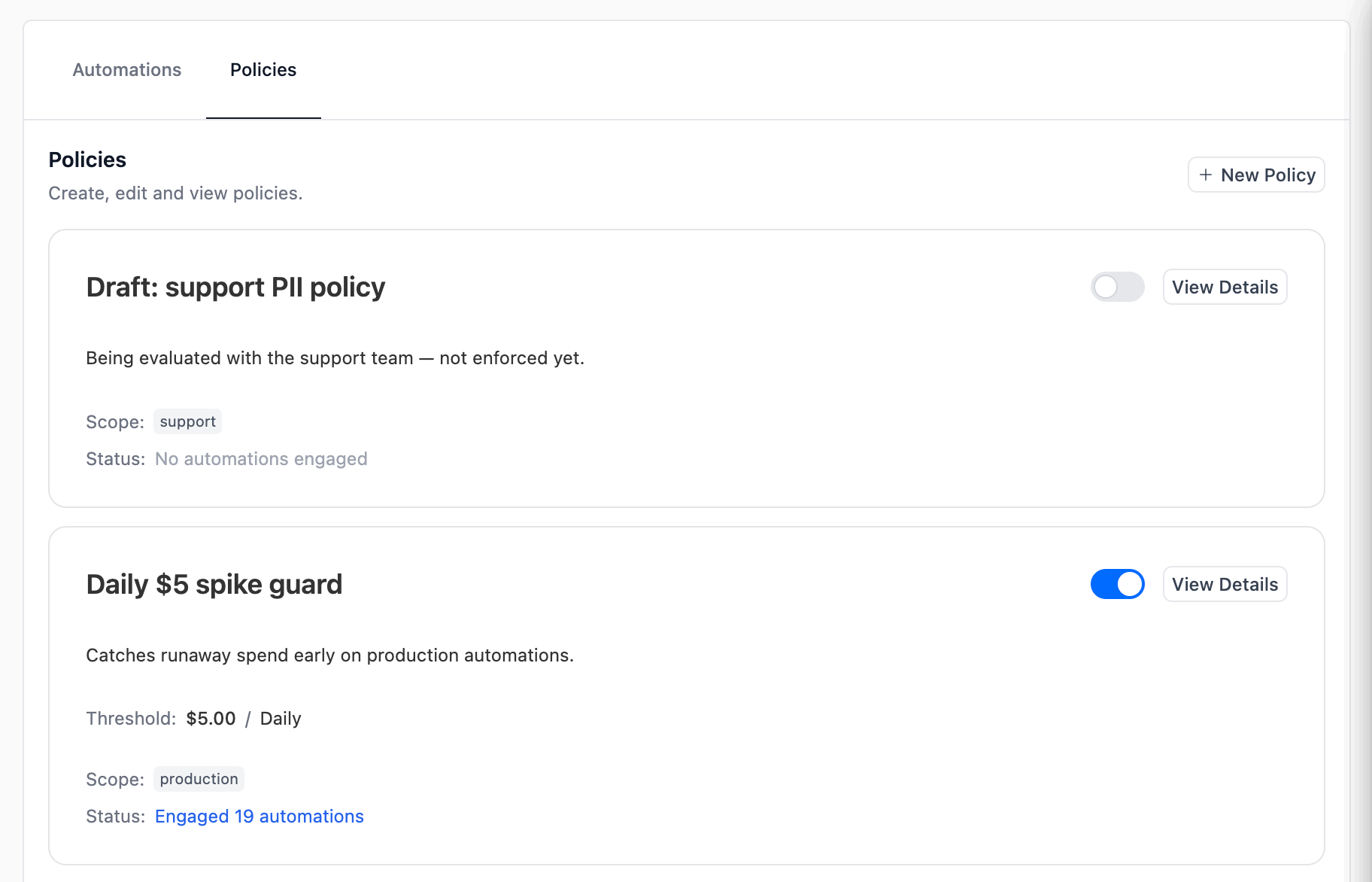 각 정책 카드에는 이름, 설명, 정책이 적용되는 **범위(scope)**(선택된 도구와 태그), 그리고 현재 범위와 일치하는 deployment의 수인 **engaged automations**가 표시됩니다. 오른쪽 토글로 정책을 삭제하지 않고 활성/비활성할 수 있습니다.
## 요구사항
PII Redaction 정책을 생성하거나 편집하려면 **Enterprise 또는 Ultra 플랜**이 필요합니다. 하위 플랜의 조직도 Policies 탭을 열고 기존 정책을 볼 수는 있지만, 편집기는 "Enterprise" 잠금 핀과 *"PII Redaction policies require an Enterprise plan."* 경고와 함께 읽기 전용으로 렌더링됩니다. 업그레이드하려면 계정 오너 또는 영업팀에 문의하세요.
* **Agent Control Plane** 기능이 조직에 대해 활성화되어 있어야 합니다. [개요 — 요구사항](/platform/ko/features/agent-control-plane/overview#요구사항)을 참고하세요.
* 정책을 생성·편집·토글·삭제하려면 Agent Control Plane에 대한 [RBAC](/platform/ko/features/rbac)의 `manage` 권한이 필요합니다. 보려면 `read` 권한만으로 충분합니다.
* 모든 정책 변경은 감사를 위해 버전 관리됩니다.
## 사용 가능한 정책 유형
| 유형 | 동작 |
| - | - |
| **PII Redaction** | 일치하는 모든 자동화의 실행에 PII redaction을 적용합니다. [Traces용 PII Redaction](/platform/ko/features/pii-trace-redactions)에 문서화된 동일한 엔티티 카탈로그와 커스텀 recognizer를 사용합니다. |
향후 더 많은 정책 유형이 추가될 예정입니다.
## 정책 만들기
각 정책 카드에는 이름, 설명, 정책이 적용되는 **범위(scope)**(선택된 도구와 태그), 그리고 현재 범위와 일치하는 deployment의 수인 **engaged automations**가 표시됩니다. 오른쪽 토글로 정책을 삭제하지 않고 활성/비활성할 수 있습니다.
## 요구사항
PII Redaction 정책을 생성하거나 편집하려면 **Enterprise 또는 Ultra 플랜**이 필요합니다. 하위 플랜의 조직도 Policies 탭을 열고 기존 정책을 볼 수는 있지만, 편집기는 "Enterprise" 잠금 핀과 *"PII Redaction policies require an Enterprise plan."* 경고와 함께 읽기 전용으로 렌더링됩니다. 업그레이드하려면 계정 오너 또는 영업팀에 문의하세요.
* **Agent Control Plane** 기능이 조직에 대해 활성화되어 있어야 합니다. [개요 — 요구사항](/platform/ko/features/agent-control-plane/overview#요구사항)을 참고하세요.
* 정책을 생성·편집·토글·삭제하려면 Agent Control Plane에 대한 [RBAC](/platform/ko/features/rbac)의 `manage` 권한이 필요합니다. 보려면 `read` 권한만으로 충분합니다.
* 모든 정책 변경은 감사를 위해 버전 관리됩니다.
## 사용 가능한 정책 유형
| 유형 | 동작 |
| - | - |
| **PII Redaction** | 일치하는 모든 자동화의 실행에 PII redaction을 적용합니다. [Traces용 PII Redaction](/platform/ko/features/pii-trace-redactions)에 문서화된 동일한 엔티티 카탈로그와 커스텀 recognizer를 사용합니다. |
향후 더 많은 정책 유형이 추가될 예정입니다.
## 정책 만들기
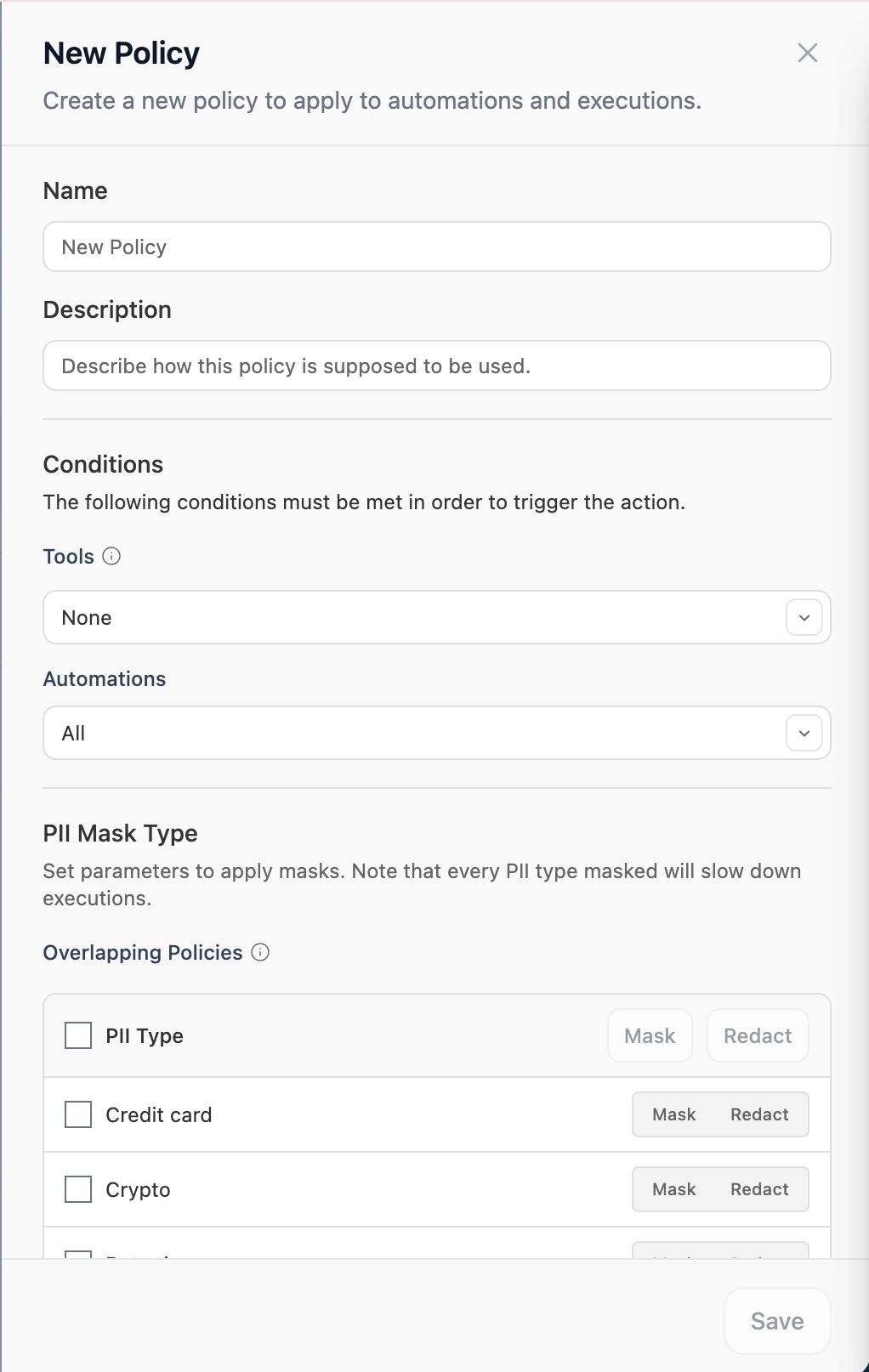 Policies 탭 오른쪽 상단의 **+ Create new**를 클릭하거나, 기존 정책 카드의 **View Details**를 클릭합니다.
정책에 명확한 이름(예: *Mask PII (CC)*)과 적용 시점을 설명하는 description을 부여합니다. 둘 다 정책 카드와 Engaged Automations 모달에 표시됩니다.
현재 **PII Redaction**만 사용할 수 있습니다.
조건은 정책이 어떤 자동화에 engage 할지 결정합니다. 둘 다 선택 사항이며 **집합 동일성(set-equality)** 의미론을 사용합니다:
* **Tools** — 도구 집합이 선택된 도구와 **정확히 일치**하는 자동화만 engage 됩니다. Studio 앱, MCP, OSS 도구, Tool Repository registry 도구 중에서 선택합니다.
* **Automations** — 태그 집합이 선택된 태그와 **정확히 일치**하는 자동화만 engage 됩니다.
피커를 비워두면 "이 차원에서 필터링하지 않음"을 의미합니다. 두 피커를 모두 비워두면 정책이 조직의 **모든** 자동화에 적용됩니다.
적용할 각 엔티티 유형을 체크하고 **Mask**(엔티티 레이블로 치환, 예: ``) 또는 **Redact**(일치하는 텍스트를 완전히 제거) 중에서 선택합니다. 전체 엔티티 카탈로그와 조직 단위 커스텀 recognizer 추가 방법은 [Traces용 PII Redaction](/platform/ko/features/pii-trace-redactions)을 참고하세요.
저장하는 즉시 engage 된 모든 자동화의 **향후** 실행에 정책이 적용됩니다. 재배포는 필요 없습니다.
## Engaged automations
정책 카드의 **Engaged N automations**를 클릭하면 현재 정책이 일치시키고 있는 deployment와 각 deployment의 마지막 실행을 정확히 확인할 수 있습니다.
Policies 탭 오른쪽 상단의 **+ Create new**를 클릭하거나, 기존 정책 카드의 **View Details**를 클릭합니다.
정책에 명확한 이름(예: *Mask PII (CC)*)과 적용 시점을 설명하는 description을 부여합니다. 둘 다 정책 카드와 Engaged Automations 모달에 표시됩니다.
현재 **PII Redaction**만 사용할 수 있습니다.
조건은 정책이 어떤 자동화에 engage 할지 결정합니다. 둘 다 선택 사항이며 **집합 동일성(set-equality)** 의미론을 사용합니다:
* **Tools** — 도구 집합이 선택된 도구와 **정확히 일치**하는 자동화만 engage 됩니다. Studio 앱, MCP, OSS 도구, Tool Repository registry 도구 중에서 선택합니다.
* **Automations** — 태그 집합이 선택된 태그와 **정확히 일치**하는 자동화만 engage 됩니다.
피커를 비워두면 "이 차원에서 필터링하지 않음"을 의미합니다. 두 피커를 모두 비워두면 정책이 조직의 **모든** 자동화에 적용됩니다.
적용할 각 엔티티 유형을 체크하고 **Mask**(엔티티 레이블로 치환, 예: ``) 또는 **Redact**(일치하는 텍스트를 완전히 제거) 중에서 선택합니다. 전체 엔티티 카탈로그와 조직 단위 커스텀 recognizer 추가 방법은 [Traces용 PII Redaction](/platform/ko/features/pii-trace-redactions)을 참고하세요.
저장하는 즉시 engage 된 모든 자동화의 **향후** 실행에 정책이 적용됩니다. 재배포는 필요 없습니다.
## Engaged automations
정책 카드의 **Engaged N automations**를 클릭하면 현재 정책이 일치시키고 있는 deployment와 각 deployment의 마지막 실행을 정확히 확인할 수 있습니다.
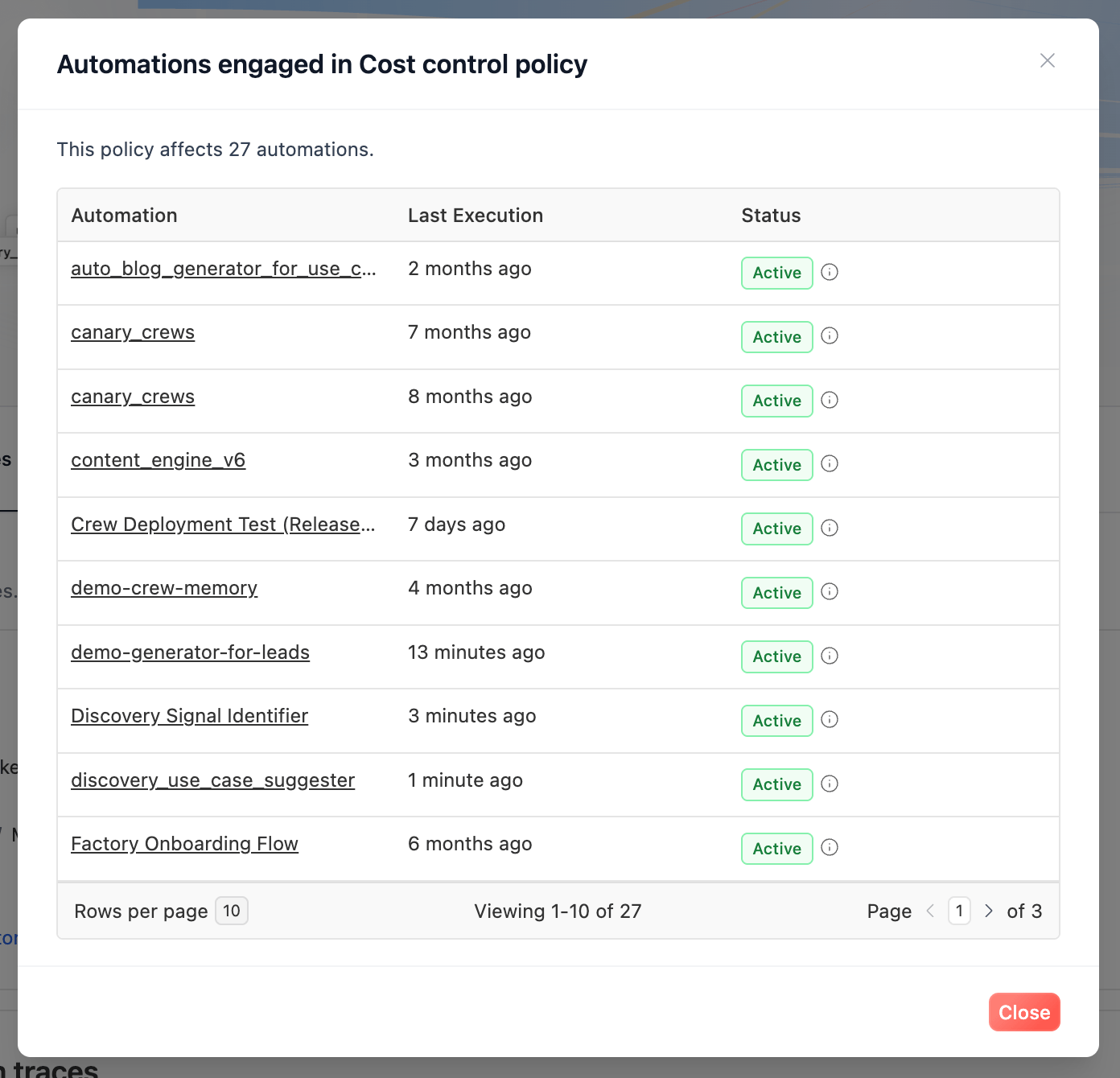 정책을 활성화하기 전에 범위를 빠르게 점검하는 가장 좋은 방법입니다. 예를 들어, `production` 태그로 범위를 지정한 정책이 의도치 않게 staging deployment를 일치시키지 않는지 확인할 수 있습니다.
## 조직 단위 정책 vs deployment 단위 설정
PII Redaction은 두 곳에서 설정할 수 있습니다:
* **deployment 단위** — 각 deployment의 **Settings → PII Protection** ([가이드](/platform/ko/features/pii-trace-redactions))
* **조직 단위** — 이 페이지의 정책
활성화된 조직 단위 정책의 범위가 어떤 deployment와 일치하면, 정책의 엔티티 구성이 그 deployment의 실행에 대해 **deployment가 소유한 PII 설정을 덮어씁니다**. 정책이 연결된 동안에는 정책이 단일 진실 공급원이 됩니다. 정책을 비활성화하거나 분리하면(또는 범위를 변경하여 더 이상 일치하지 않게 만들면) deployment는 자체 PII Protection 설정으로 되돌아갑니다.
여러 deployment에 걸쳐 일관된 정책을 강제하고 싶을 때는 조직 단위 정책을 선호하고, 일회성 예외에 대해서는 deployment 단위 설정을 사용하세요.
## 관련 문서
ACP란 무엇이며, 요구사항, 플랜 등급, RBAC에 대해.
플릿 전반의 자동화와 LLM 소비를 모니터링합니다.
엔티티 카탈로그, 커스텀 recognizer, deployment 단위 구성.
누가 정책을 만들거나 편집할 수 있는지 관리합니다.
조직의 정책을 설계하는 데 도움이 필요하시면 지원 팀에 문의하세요.
This documentation is built and hosted on [Mintlify](https://mintlify.com), a developer documentation platform.
정책을 활성화하기 전에 범위를 빠르게 점검하는 가장 좋은 방법입니다. 예를 들어, `production` 태그로 범위를 지정한 정책이 의도치 않게 staging deployment를 일치시키지 않는지 확인할 수 있습니다.
## 조직 단위 정책 vs deployment 단위 설정
PII Redaction은 두 곳에서 설정할 수 있습니다:
* **deployment 단위** — 각 deployment의 **Settings → PII Protection** ([가이드](/platform/ko/features/pii-trace-redactions))
* **조직 단위** — 이 페이지의 정책
활성화된 조직 단위 정책의 범위가 어떤 deployment와 일치하면, 정책의 엔티티 구성이 그 deployment의 실행에 대해 **deployment가 소유한 PII 설정을 덮어씁니다**. 정책이 연결된 동안에는 정책이 단일 진실 공급원이 됩니다. 정책을 비활성화하거나 분리하면(또는 범위를 변경하여 더 이상 일치하지 않게 만들면) deployment는 자체 PII Protection 설정으로 되돌아갑니다.
여러 deployment에 걸쳐 일관된 정책을 강제하고 싶을 때는 조직 단위 정책을 선호하고, 일회성 예외에 대해서는 deployment 단위 설정을 사용하세요.
## 관련 문서
ACP란 무엇이며, 요구사항, 플랜 등급, RBAC에 대해.
플릿 전반의 자동화와 LLM 소비를 모니터링합니다.
엔티티 카탈로그, 커스텀 recognizer, deployment 단위 구성.
누가 정책을 만들거나 편집할 수 있는지 관리합니다.
조직의 정책을 설계하는 데 도움이 필요하시면 지원 팀에 문의하세요.
This documentation is built and hosted on [Mintlify](https://mintlify.com), a developer documentation platform.