> ## Documentation Index
> Fetch the complete documentation index at: https://docs-platform.crewai.com/llms.txt
> Use this file to discover all available pages before exploring further.
# Agent Control Plane 개요
> 라이브 자동화의 통합 운영 허브 — 플릿 상태, LLM 소비, 조직 단위 정책을 한 화면에서.
**ACP (베타) 문서 내비게이션**
* **개요** *(현재 페이지)*
* [모니터링](/platform/ko/features/agent-control-plane/monitoring)
* [정책](/platform/ko/features/agent-control-plane/policies)
## 개요
**Agent Control Plane**(ACP)은 CrewAI AMP에서 실행 중인 모든 워크로드를 위한 운영 허브입니다. **Automations**와 **Policies** 두 개의 탭으로 구성된 단일 화면에서 다음 작업을 할 수 있습니다:
* 모든 라이브 자동화(crew 또는 flow)의 \*\*상태(health)\*\*를 `Critical` / `Warning` / `Healthy` 분포와 실행 횟수로 모니터링합니다.
* 자동화별·공급자별·모델별 **LLM 소비**(토큰 및 비용)를 추적하고, 이전 기간 대비 변화량을 확인합니다.
* 임의의 자동화 또는 모델 공급자를 드릴다운하여 시계열 차트와 공급자별 분해를 살펴봅니다.
* 조직 전체에 **정책(Policies)**(현재: PII Redaction)을 적용하여 각 deployment를 개별 편집하지 않고 한 번에 여러 자동화에 정책을 강제합니다.
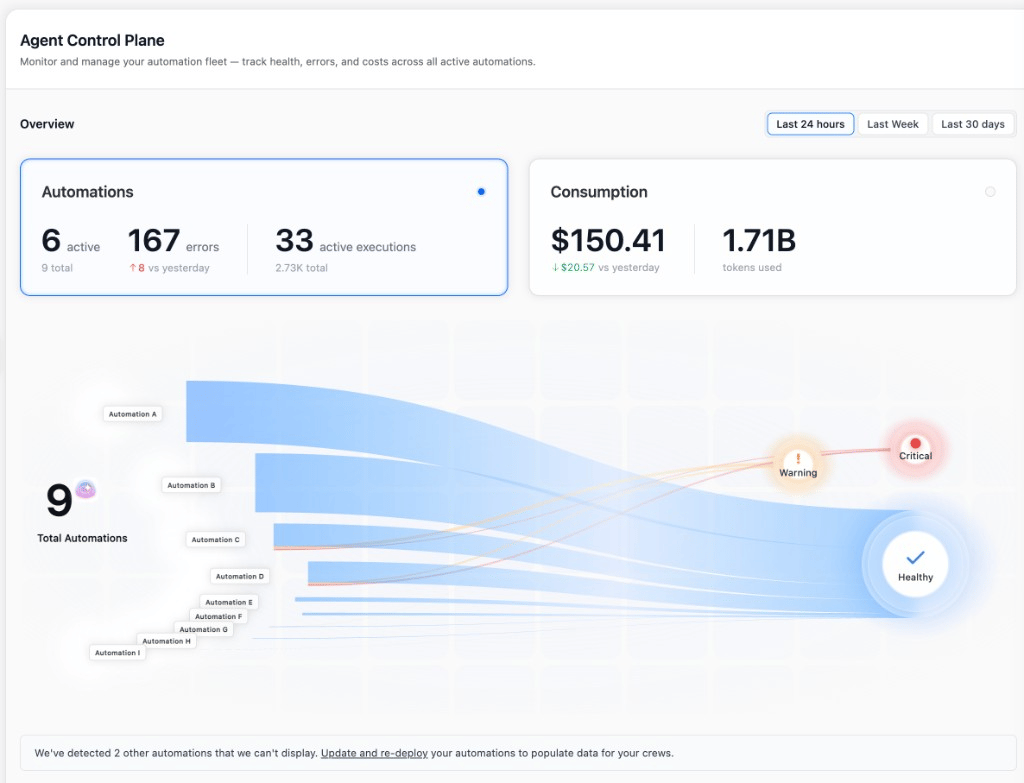 Agent Control Plane은 현재 CrewAI Platform에서 **Beta**로 표시되어 있습니다.
두 탭은 서로 다른 두 가지 질문에 답합니다:
* **Automations** — *"지금 내 플릿은 어떻게 동작하고 있고, 얼마나 비용이 들고 있는가?"* [모니터링](/platform/ko/features/agent-control-plane/monitoring)을 참고하세요.
* **Policies** — *"정책(예: PII redaction)을 매번 재배포하지 않고 여러 deployment에 어떻게 강제할 수 있는가?"* [정책](/platform/ko/features/agent-control-plane/policies)을 참고하세요.
## 요구사항
이 페이지에서 자동화에 대한 데이터(상태, 실행, 오류, 토큰, 비용)를 채우려면 **crewAI v1.13 이상**이 필요합니다. 모든 데이터는 `crewai==1.13`에서 활성화된 텔레메트리를 통해 흘러갑니다. 그 이전 deployment는 *"We've detected N other automations that we can't display"* 배너에 나타나며, 업데이트하고 재배포할 때까지 어떤 행에도 데이터를 기여하지 않습니다.
[정책](/platform/ko/features/agent-control-plane/policies)을 생성하거나 편집하려면 **Enterprise 또는 Ultra 플랜**이 필요합니다. 하위 플랜의 조직도 Policies 탭을 열고 기존 정책을 볼 수 있지만, 편집기는 "Enterprise" 잠금 핀과 *"PII Redaction policies require an Enterprise plan."* 경고와 함께 읽기 전용으로 표시됩니다. 모니터링(Automations 탭)은 기능이 활성화된 모든 플랜에서 사용할 수 있습니다.
* **Agent Control Plane** 기능이 조직에 대해 활성화되어 있어야 합니다. 사이드바에 보이지 않으면 계정 오너에게 활성화를 요청하세요.
* ACP 내부에서는 [RBAC](/platform/ko/features/rbac)가 접근 권한을 관리합니다: 대시보드 및 정책을 보려면 `read`, 정책을 생성·편집·토글·삭제하려면 `manage` 권한이 필요합니다.
* 모든 차트와 테이블은 오른쪽 상단의 시간 선택기를 통해 **지난 24시간**, **지난 1주**, **지난 30일**로 범위를 조정할 수 있습니다. 변화량(`↑ 8 vs yesterday`, `↓ $20.57 vs yesterday` 등)은 선택한 윈도우를 같은 길이의 이전 윈도우와 비교합니다.
## 여기에서 할 수 있는 일
메트릭 카드, 인터랙티브 sankey, 자동화별 테이블, 자동화 또는 공급자별 드릴다운 사이드 패널로 플릿 상태와 LLM 지출을 살펴봅니다.
도구와 태그로 범위를 지정한 PII Redaction 정책을 조직 단위로 적용합니다. 변경 사항은 다음 실행부터 적용되며 재배포가 필요 없습니다.
## 관련 문서
개별 실행을 드릴다운하여 에이전트의 추론, 도구 호출, 토큰 사용량을 확인합니다.
누가 Agent Control Plane을 읽을 수 있고 누가 정책을 편집할 수 있는지 관리합니다.
정책이 참조하는 엔티티 카탈로그 및 deployment 단위 PII 설정.
Agent Control Plane을 지원하는 crewAI 버전으로 crew를 배포합니다.
메트릭 해석 또는 정책 설계에 도움이 필요하시면 지원 팀에 문의하세요.
This documentation is built and hosted on [Mintlify](https://mintlify.com), a developer documentation platform.
Agent Control Plane은 현재 CrewAI Platform에서 **Beta**로 표시되어 있습니다.
두 탭은 서로 다른 두 가지 질문에 답합니다:
* **Automations** — *"지금 내 플릿은 어떻게 동작하고 있고, 얼마나 비용이 들고 있는가?"* [모니터링](/platform/ko/features/agent-control-plane/monitoring)을 참고하세요.
* **Policies** — *"정책(예: PII redaction)을 매번 재배포하지 않고 여러 deployment에 어떻게 강제할 수 있는가?"* [정책](/platform/ko/features/agent-control-plane/policies)을 참고하세요.
## 요구사항
이 페이지에서 자동화에 대한 데이터(상태, 실행, 오류, 토큰, 비용)를 채우려면 **crewAI v1.13 이상**이 필요합니다. 모든 데이터는 `crewai==1.13`에서 활성화된 텔레메트리를 통해 흘러갑니다. 그 이전 deployment는 *"We've detected N other automations that we can't display"* 배너에 나타나며, 업데이트하고 재배포할 때까지 어떤 행에도 데이터를 기여하지 않습니다.
[정책](/platform/ko/features/agent-control-plane/policies)을 생성하거나 편집하려면 **Enterprise 또는 Ultra 플랜**이 필요합니다. 하위 플랜의 조직도 Policies 탭을 열고 기존 정책을 볼 수 있지만, 편집기는 "Enterprise" 잠금 핀과 *"PII Redaction policies require an Enterprise plan."* 경고와 함께 읽기 전용으로 표시됩니다. 모니터링(Automations 탭)은 기능이 활성화된 모든 플랜에서 사용할 수 있습니다.
* **Agent Control Plane** 기능이 조직에 대해 활성화되어 있어야 합니다. 사이드바에 보이지 않으면 계정 오너에게 활성화를 요청하세요.
* ACP 내부에서는 [RBAC](/platform/ko/features/rbac)가 접근 권한을 관리합니다: 대시보드 및 정책을 보려면 `read`, 정책을 생성·편집·토글·삭제하려면 `manage` 권한이 필요합니다.
* 모든 차트와 테이블은 오른쪽 상단의 시간 선택기를 통해 **지난 24시간**, **지난 1주**, **지난 30일**로 범위를 조정할 수 있습니다. 변화량(`↑ 8 vs yesterday`, `↓ $20.57 vs yesterday` 등)은 선택한 윈도우를 같은 길이의 이전 윈도우와 비교합니다.
## 여기에서 할 수 있는 일
메트릭 카드, 인터랙티브 sankey, 자동화별 테이블, 자동화 또는 공급자별 드릴다운 사이드 패널로 플릿 상태와 LLM 지출을 살펴봅니다.
도구와 태그로 범위를 지정한 PII Redaction 정책을 조직 단위로 적용합니다. 변경 사항은 다음 실행부터 적용되며 재배포가 필요 없습니다.
## 관련 문서
개별 실행을 드릴다운하여 에이전트의 추론, 도구 호출, 토큰 사용량을 확인합니다.
누가 Agent Control Plane을 읽을 수 있고 누가 정책을 편집할 수 있는지 관리합니다.
정책이 참조하는 엔티티 카탈로그 및 deployment 단위 PII 설정.
Agent Control Plane을 지원하는 crewAI 버전으로 crew를 배포합니다.
메트릭 해석 또는 정책 설계에 도움이 필요하시면 지원 팀에 문의하세요.
This documentation is built and hosted on [Mintlify](https://mintlify.com), a developer documentation platform.