> ## Documentation Index
> Fetch the complete documentation index at: https://docs-platform.crewai.com/llms.txt
> Use this file to discover all available pages before exploring further.
# راقب أتمتاتك
> راقب صحة الأسطول واستهلاك LLM وسلوك كل أتمتة من تبويب Automations.
**تنقل وثائق ACP (إصدار تجريبي)**
* [نظرة عامة](/platform/ar/features/agent-control-plane/overview)
* **المراقبة** *(أنت هنا)*
* [السياسات](/platform/ar/features/agent-control-plane/policies)
## نظرة عامة
تبويب **Automations** هو عرض العمليات للقراءة فقط في [Agent Control Plane](/platform/ar/features/agent-control-plane/overview). يجمع بين بطاقتَي مقاييس و sankey تفاعلي وجدولين فرعيين — **Automations** و **Consumption** — يمكنك البحث والتصفية والفرز فيهما.
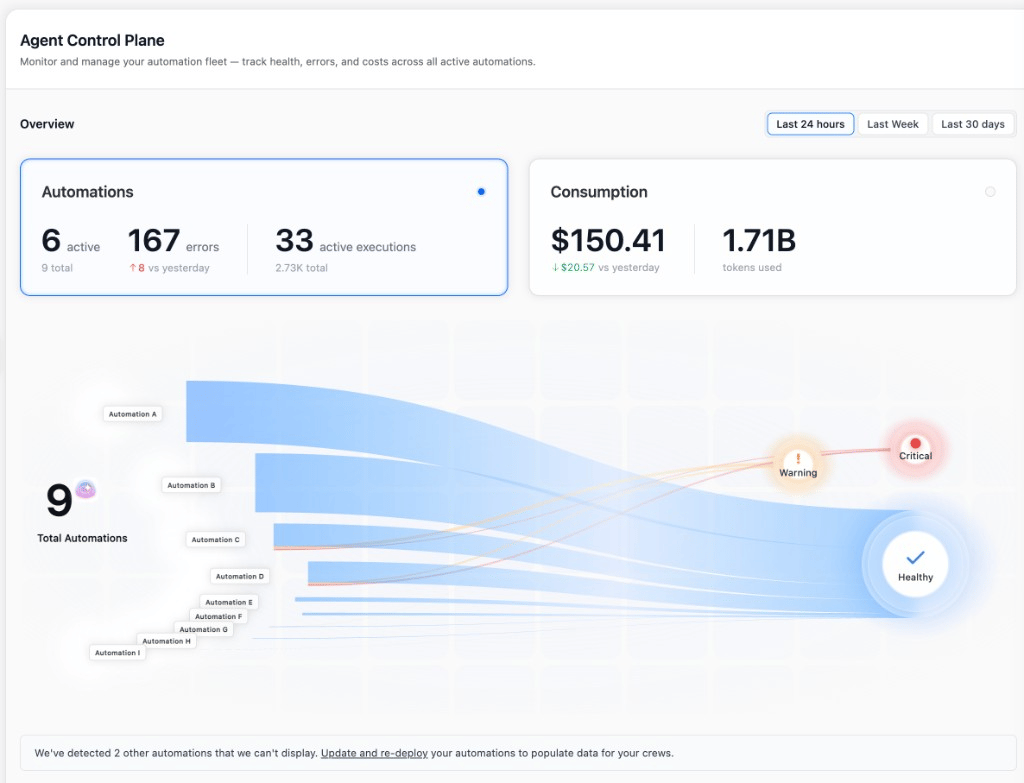 تحترم جميع المخططات والجداول مُحدّد **آخر 24 ساعة / الأسبوع الماضي / آخر 30 يوماً** في أعلى اليمين. تقارن قيم الفرق النافذة المختارة بالنافذة السابقة بنفس الطول.
تعرض الصفوف بيانات فقط لعمليات النشر على **crewAI v1.13 أو أحدث** — تظهر عمليات النشر الأقدم في لافتة *"We've detected N other automations that we can't display"* أسفل sankey ولا تساهم بأي مقاييس حتى يتم تحديثها وإعادة نشرها. راجع [نظرة عامة — المتطلبات](/platform/ar/features/agent-control-plane/overview#المتطلبات).
## لوحة المعلومات
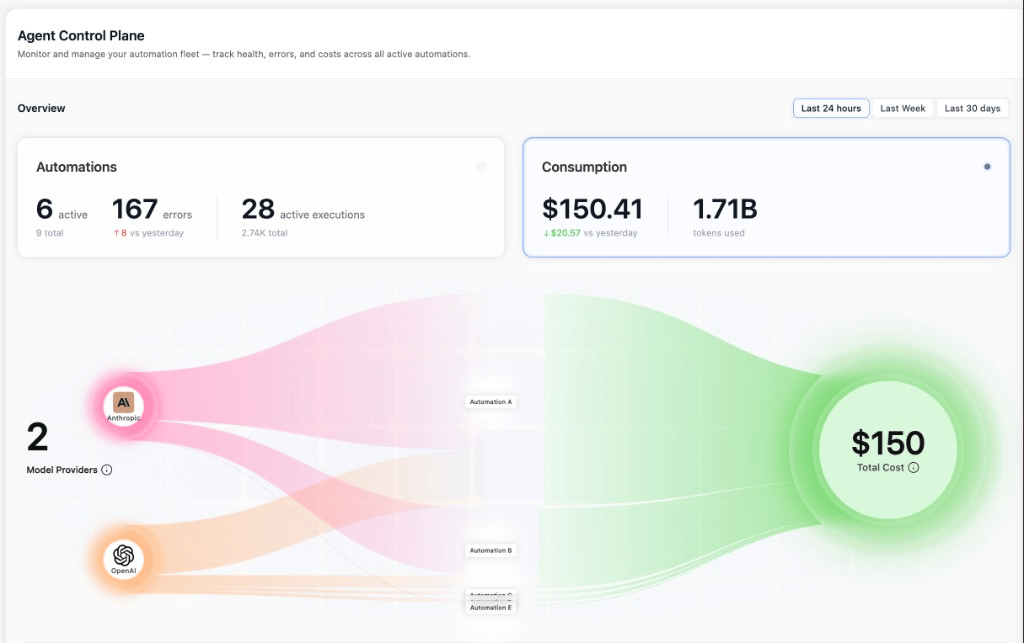
يحتوي رأس الصفحة على بطاقتَي مقاييس و sankey تفاعلي. النقر على أي من البطاقتين يبدّل sankey بين وضعَين:
* **وضع الصحة** — `إجمالي الأتمتات → حِزم الحالة (Critical / Warning / Healthy)`. انقر على حِزمة لتصفية جدول Automations إلى عمليات النشر تلك فقط.
* **وضع الاستهلاك** — `مزودو النماذج → الأتمتات → التكلفة الإجمالية`. انقر على مزود لتصفية جدول Consumption إلى ذلك المزود.
| البطاقة | ما تعرضه |
| - | - |
| **Automations** | الأتمتات `active` (والعدد الإجمالي)، إجمالي `errors` في النافذة، `active executions` الحالية (والإجمالي في النافذة)، مع الفرق مقابل الفترة السابقة. |
| **Consumption** | إجمالي `cost` و `tokens used`، مع فرق التكلفة مقابل الفترة السابقة. |
تحترم جميع المخططات والجداول مُحدّد **آخر 24 ساعة / الأسبوع الماضي / آخر 30 يوماً** في أعلى اليمين. تقارن قيم الفرق النافذة المختارة بالنافذة السابقة بنفس الطول.
تعرض الصفوف بيانات فقط لعمليات النشر على **crewAI v1.13 أو أحدث** — تظهر عمليات النشر الأقدم في لافتة *"We've detected N other automations that we can't display"* أسفل sankey ولا تساهم بأي مقاييس حتى يتم تحديثها وإعادة نشرها. راجع [نظرة عامة — المتطلبات](/platform/ar/features/agent-control-plane/overview#المتطلبات).
## لوحة المعلومات
يحتوي رأس الصفحة على بطاقتَي مقاييس و sankey تفاعلي. النقر على أي من البطاقتين يبدّل sankey بين وضعَين:
* **وضع الصحة** — `إجمالي الأتمتات → حِزم الحالة (Critical / Warning / Healthy)`. انقر على حِزمة لتصفية جدول Automations إلى عمليات النشر تلك فقط.
* **وضع الاستهلاك** — `مزودو النماذج → الأتمتات → التكلفة الإجمالية`. انقر على مزود لتصفية جدول Consumption إلى ذلك المزود.
| البطاقة | ما تعرضه |
| - | - |
| **Automations** | الأتمتات `active` (والعدد الإجمالي)، إجمالي `errors` في النافذة، `active executions` الحالية (والإجمالي في النافذة)، مع الفرق مقابل الفترة السابقة. |
| **Consumption** | إجمالي `cost` و `tokens used`، مع فرق التكلفة مقابل الفترة السابقة. |
 ## جدول Automations
التبويب الفرعي **Automations** هو تفصيل صحة الأسطول لكل deployment. كل صف هو crew أو flow منشور.
## جدول Automations
التبويب الفرعي **Automations** هو تفصيل صحة الأسطول لكل deployment. كل صف هو crew أو flow منشور.
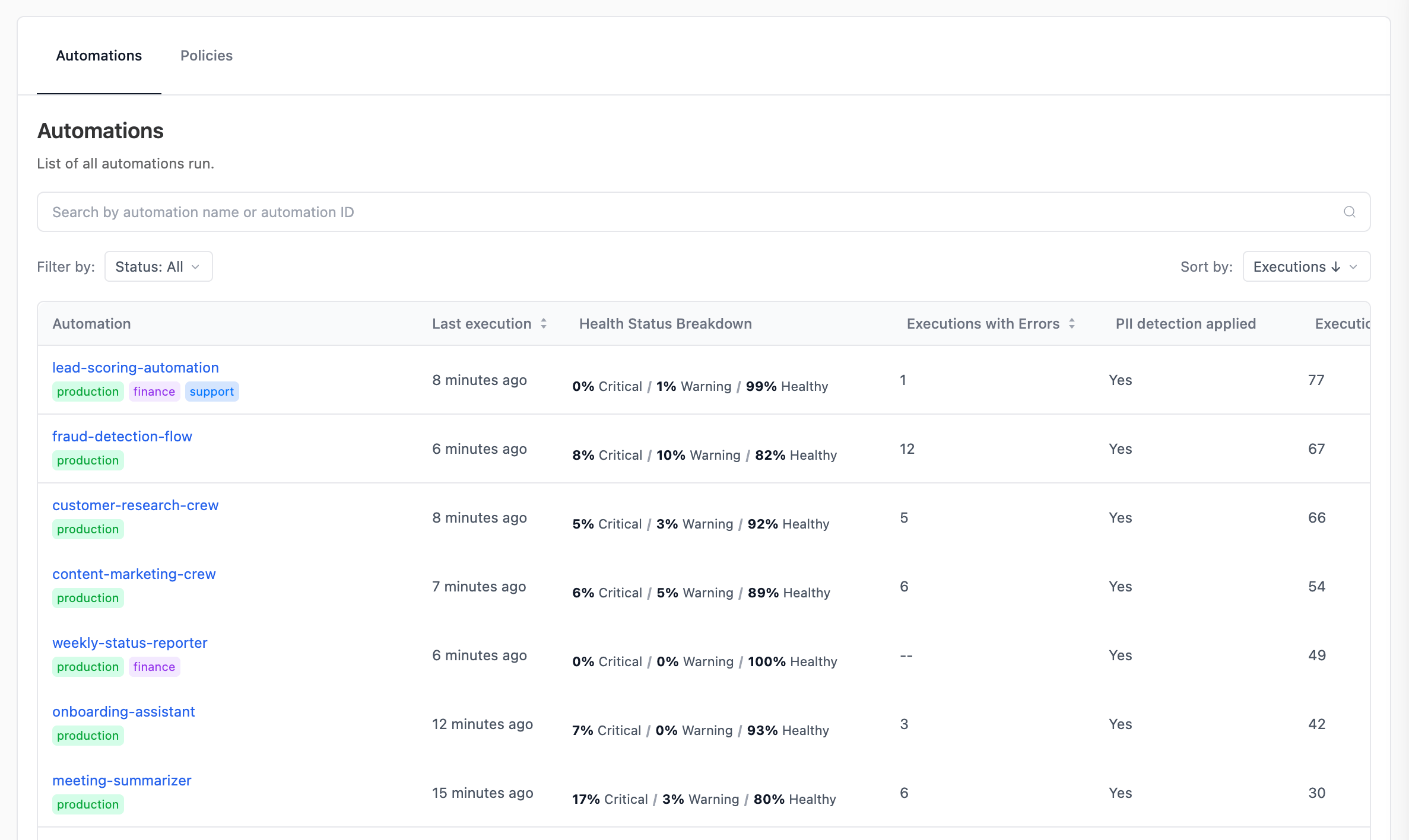 | العمود | ما يعرضه |
| - | - |
| **Automation** | اسم الـ deployment وأي وسوم مُسنَدة إليه (مثل `production`، `financial`). |
| **Last execution** | الوقت المنقضي منذ آخر تنفيذ. |
| **Health Status Breakdown** | شريط مكدّس بنسب `Critical` / `Warning` / `Healthy` لعمليات التنفيذ في النافذة. |
| **Executions with Errors** | إجمالي عمليات التنفيذ الفاشلة في النافذة. |
| **PII detection applied** | `Yes` إذا كان هناك تكوين PII لكل deployment أو [سياسة PII](/platform/ar/features/agent-control-plane/policies) مطابِقة نشطة. |
| **Executions** | إجمالي عمليات التنفيذ في النافذة. |
| **Last updated** | متى أُعيد نشر الـ deployment آخر مرة. |
| **Crew Version** | إصدار `crewai` الذي يُبلِّغ عنه الـ deployment. يشير أيقونة المعلومات بجانب الإصدارات الأقل من `1.13` إلى صفوف لا يمكنها المساهمة بالمقاييس. |
ابحث بالاسم، صفِّ حسب `Status` (`Healthy` / `Warning` / `Critical`)، وافرز بأي رأس عمود. انقر على اسم الـ deployment لفتح **لوحة الأتمتة**.
## جدول Consumption
التبويب الفرعي **Consumption** هو تفصيل إنفاق LLM واستخدام الرموز لكل deployment.
| العمود | ما يعرضه |
| - | - |
| **Automation** | اسم الـ deployment وأي وسوم مُسنَدة إليه (مثل `production`، `financial`). |
| **Last execution** | الوقت المنقضي منذ آخر تنفيذ. |
| **Health Status Breakdown** | شريط مكدّس بنسب `Critical` / `Warning` / `Healthy` لعمليات التنفيذ في النافذة. |
| **Executions with Errors** | إجمالي عمليات التنفيذ الفاشلة في النافذة. |
| **PII detection applied** | `Yes` إذا كان هناك تكوين PII لكل deployment أو [سياسة PII](/platform/ar/features/agent-control-plane/policies) مطابِقة نشطة. |
| **Executions** | إجمالي عمليات التنفيذ في النافذة. |
| **Last updated** | متى أُعيد نشر الـ deployment آخر مرة. |
| **Crew Version** | إصدار `crewai` الذي يُبلِّغ عنه الـ deployment. يشير أيقونة المعلومات بجانب الإصدارات الأقل من `1.13` إلى صفوف لا يمكنها المساهمة بالمقاييس. |
ابحث بالاسم، صفِّ حسب `Status` (`Healthy` / `Warning` / `Critical`)، وافرز بأي رأس عمود. انقر على اسم الـ deployment لفتح **لوحة الأتمتة**.
## جدول Consumption
التبويب الفرعي **Consumption** هو تفصيل إنفاق LLM واستخدام الرموز لكل deployment.
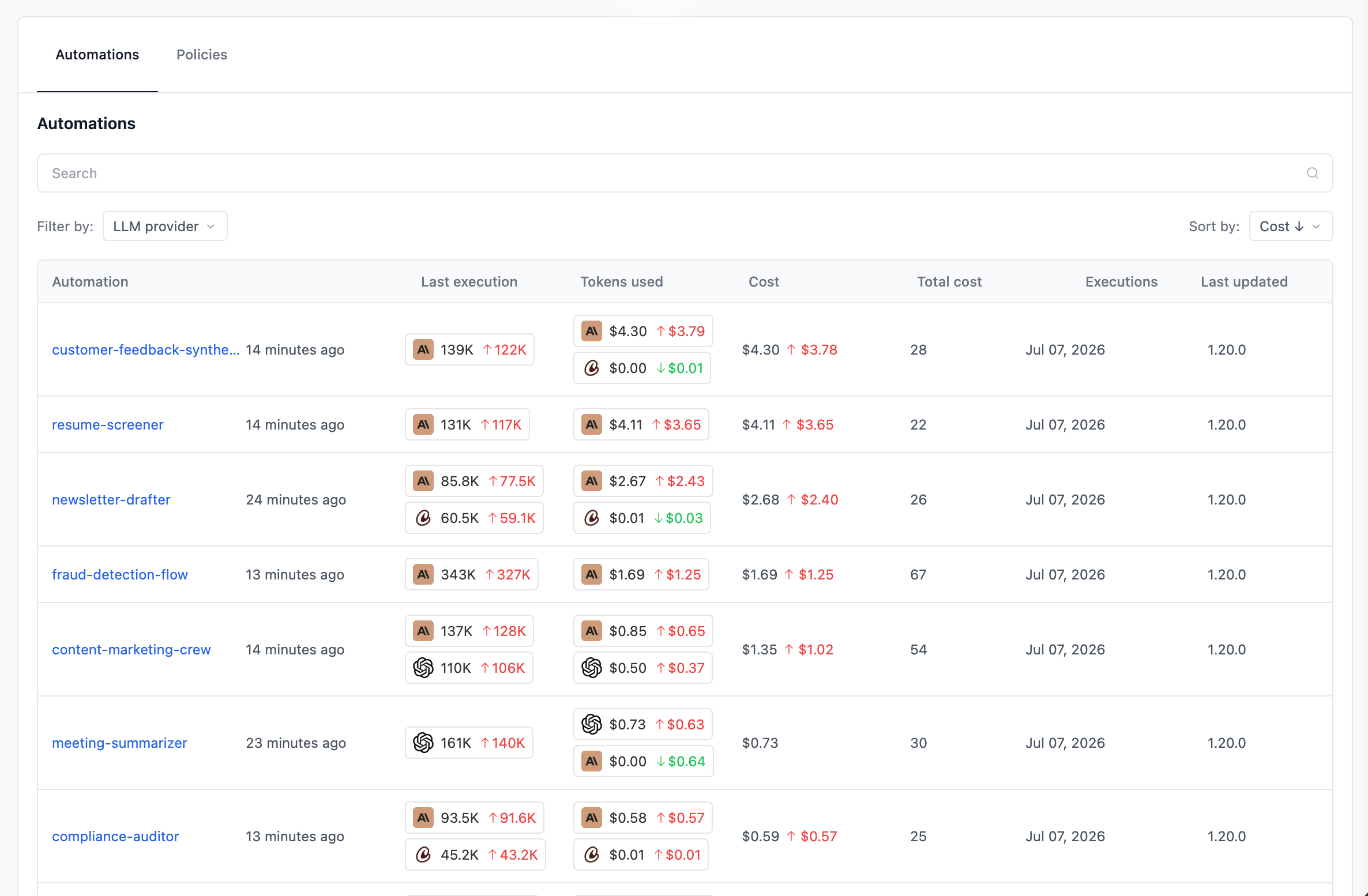 | العمود | ما يعرضه |
| - | - |
| **Automation** | اسم الـ deployment. |
| **Last execution** | الوقت المنقضي منذ آخر تنفيذ. |
| **Tokens used** | صف واحد لكل مزود LLM تستخدمه هذه الأتمتة، مع الفرق مقابل الفترة السابقة. |
| **Cost** | التكلفة لكل مزود LLM، مع الفرق مقابل الفترة السابقة. |
| **Total cost** | المجموع عبر جميع المزودين، مع الفرق. |
| **Executions** | إجمالي عمليات التنفيذ في النافذة. |
| **Last updated** | متى أُعيد نشر الـ deployment آخر مرة. |
| **Crew Version** | إصدار `crewai` الذي يُبلِّغ عنه الـ deployment. |
صفِّ حسب **LLM provider** وافرز حسب `Cost` أو `Executions` أو `Last run`.
**عادة ما تعني الخلايا الفارغة (`—` أو `$0.00`) أن الـ deployment أدنى من crewAI v1.13.** في اللقطة أعلاه، تظهر *Automation F* (`1.7.0`) و *Automation I* (`1.12.2`) فارغة في الرموز والتكلفة — لا تزال عمليات التنفيذ تعمل، لكنها لا تُصدِر التليمتري على مستوى المزود الذي يُغذِّي هذا الجدول. حدّث هذه الـ crews وأعد نشرها لبدء جمع بيانات الاستهلاك.
## ذو صلة
ما هو ACP، المتطلبات، مستويات الخطط، و RBAC.
طبّق سياسات PII Redaction على مستوى المؤسسة عبر العديد من الأتمتات.
تعمّق في تنفيذ واحد لرؤية تفكير الوكيل واستدعاءات الأدوات واستخدام الرموز.
انشر crew على إصدار crewAI يدعم Agent Control Plane.
تواصل مع فريق الدعم للمساعدة في تفسير المقاييس داخل Agent Control Plane.
This documentation is built and hosted on [Mintlify](https://mintlify.com), a developer documentation platform.
| العمود | ما يعرضه |
| - | - |
| **Automation** | اسم الـ deployment. |
| **Last execution** | الوقت المنقضي منذ آخر تنفيذ. |
| **Tokens used** | صف واحد لكل مزود LLM تستخدمه هذه الأتمتة، مع الفرق مقابل الفترة السابقة. |
| **Cost** | التكلفة لكل مزود LLM، مع الفرق مقابل الفترة السابقة. |
| **Total cost** | المجموع عبر جميع المزودين، مع الفرق. |
| **Executions** | إجمالي عمليات التنفيذ في النافذة. |
| **Last updated** | متى أُعيد نشر الـ deployment آخر مرة. |
| **Crew Version** | إصدار `crewai` الذي يُبلِّغ عنه الـ deployment. |
صفِّ حسب **LLM provider** وافرز حسب `Cost` أو `Executions` أو `Last run`.
**عادة ما تعني الخلايا الفارغة (`—` أو `$0.00`) أن الـ deployment أدنى من crewAI v1.13.** في اللقطة أعلاه، تظهر *Automation F* (`1.7.0`) و *Automation I* (`1.12.2`) فارغة في الرموز والتكلفة — لا تزال عمليات التنفيذ تعمل، لكنها لا تُصدِر التليمتري على مستوى المزود الذي يُغذِّي هذا الجدول. حدّث هذه الـ crews وأعد نشرها لبدء جمع بيانات الاستهلاك.
## ذو صلة
ما هو ACP، المتطلبات، مستويات الخطط، و RBAC.
طبّق سياسات PII Redaction على مستوى المؤسسة عبر العديد من الأتمتات.
تعمّق في تنفيذ واحد لرؤية تفكير الوكيل واستدعاءات الأدوات واستخدام الرموز.
انشر crew على إصدار crewAI يدعم Agent Control Plane.
تواصل مع فريق الدعم للمساعدة في تفسير المقاييس داخل Agent Control Plane.
This documentation is built and hosted on [Mintlify](https://mintlify.com), a developer documentation platform.